
What Are They?
A Wonderbook is a hardcover picture book, or early reader, with a ready-to-play audiobook located on the inside cover. Young readers can experience the joy of reading while learning at the same time.
How They Work
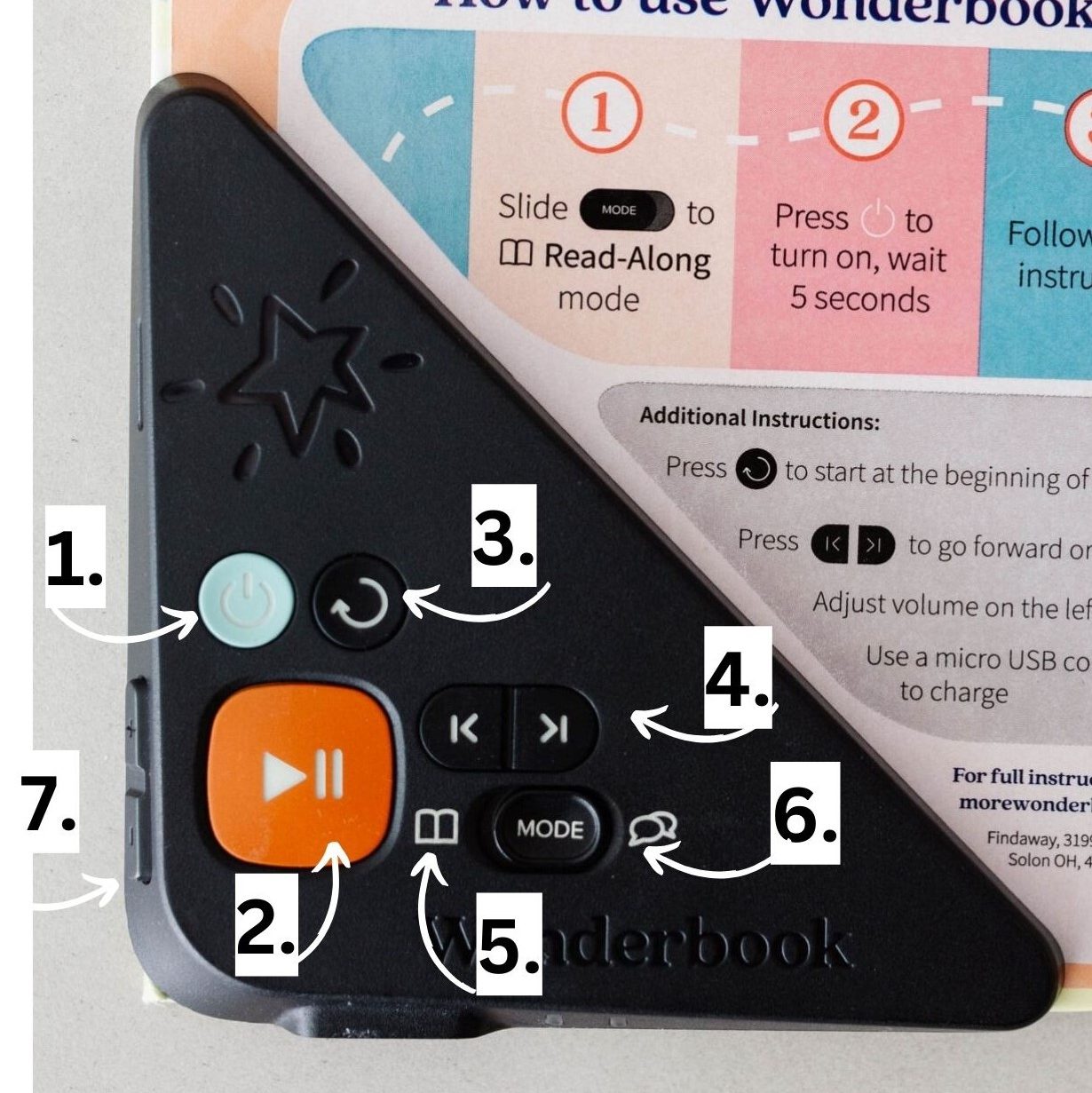
- Power Button: Turns on and off the player. Lights at the bottom of the player will indicate different things. See Frequent Questions for more info.
- Play/Pause: The big orange button gives you control to play or pause when you want.
- Rewind: Returns you to the beginning of the book at any point of the story. Please note you will have to hit the play button to start the story.
- Page Turner: Move back and forth between the pages.
- Read Along Mode: Reads the story to you. When it wants you to turn the page it will play a little jingle.
- Learning Mode: Asks thoughtful questions. Example Who was your favorite character and why? The book will pause for the answer. When you are ready for the next question hit the play button.
- Volume Controls: Located on the left side of the player. Can turn the volume louder or softer.
Frequently Asked Questions
How can I listen to Wonderbooks?
There is a volume controlled speaker attached to the book. The controls are located on the left side of the player.
Are Wonderbooks just for younger kids?
No! Wonderbook come in a large variety of titles that includes picture books, leveled readers, early chapter books, chapter books, nonfiction books, and bilingual books. Our library currently only has picture books ask the front desk to see about borrowing from another library.
What is a good age to start Wonderbooks?
The Wonderbook site recommends as young as 2 or 3, depending on your child. They may need help in the beginning to understand the controls and process.
How long will a Wonderbook play for?
Wonderbooks have a battery life of about 16-20 hours. They will play for the whole duration of the book. If left on afterwards the Wonderbook will turn itself off after 3 minutes.
How do you tell if the Wonderbook is charged?
We try to keep all our Wonderbooks charged. We recommend turning on the Wonderbook to check the battery life. On the bottom of the Wonderbook are two lights a green and red. The Wonderbook will start flashing red if there is less than an hour left of the battery life and shows a solid green light if it’s fully charged.
What do I do if the Wonderbook runs out of battery?
Please return the book to the library and let a librarian know so they can recharge the Wonderbook.